Showing posts with label KristinIvanova. Show all posts

2026/01/09

Shading the Winter Explosion 冬季爆破特效


By Hammer Chen, Kristin Ivanova

We recently introduced the Artillery Explosion tutorial available in Phoenix FD’s documentation. Now, we want to show you a variation of this scene setup - a winter explosion with its proper shading.

This scene is essentially the same as the Artillery Explosion one, except for the smoke color and HDRI lighting. The smoke color is set to light gray in order to get a snowy look. To focus on the shading we also limit the number of bombs to just one.

Since there is a hot explosion at the core, it could make the rendering over-exposed or lose detail in the white smoke volumetric shading.

The good news is Phoenix FD provides a cohort of parameters allowing you to fine-tune the shading. Here we compare some of the useful settings that deal with this issue.
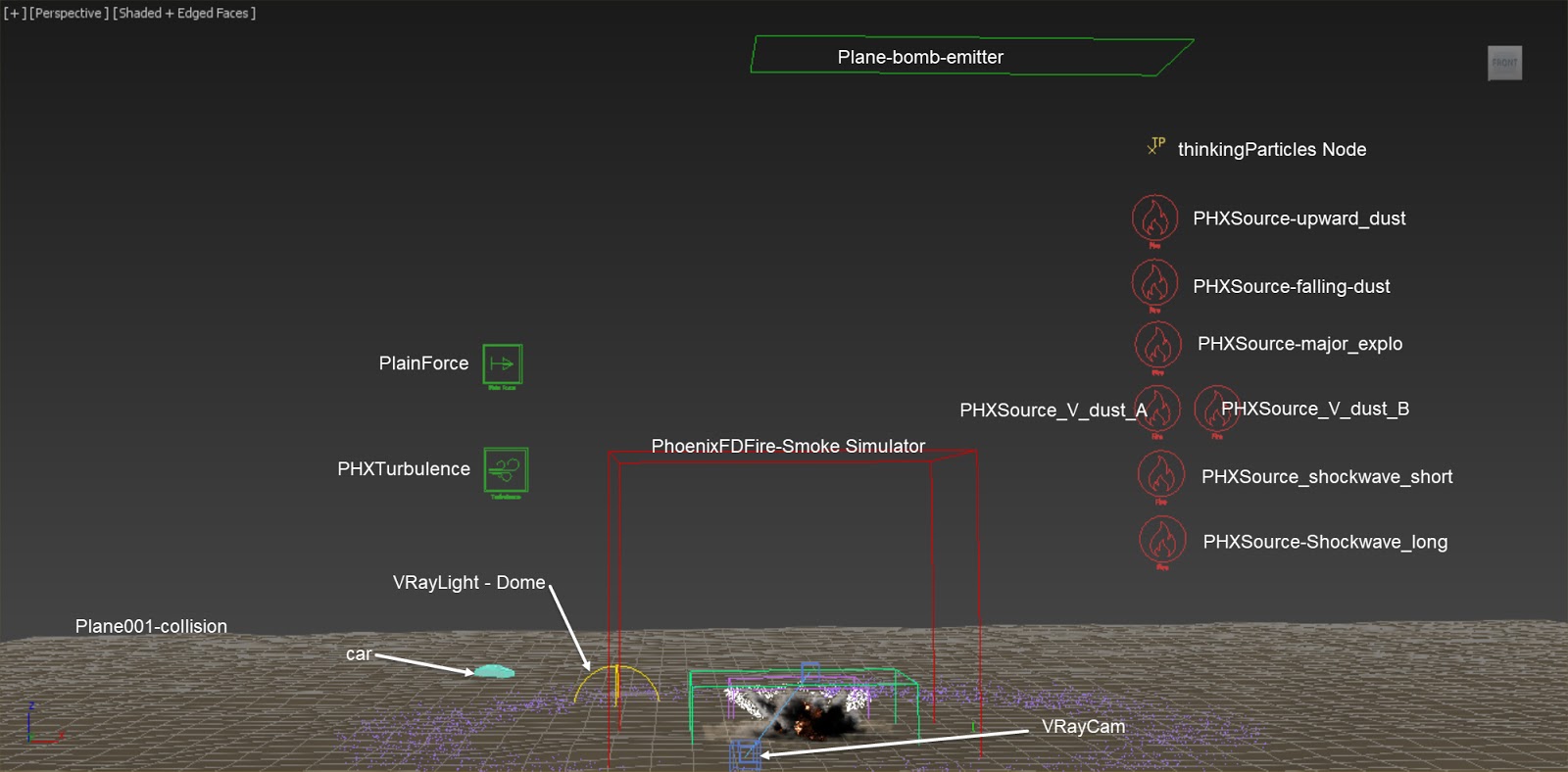

Overall Setup
The scene we use here is modified from the Artillery Explosion scene, except we add one Phoenix FD Turbulence helper and change the color of the smoke. For a step-by-step tutorial of how the Fire / Smoke sources and thinkingParticles are set up, please check out the Artillery Explosion tutorial.

Making of Lava Flow with TexUVW 岩漿特效


By Hammer Chen, Kristin Ivanova

Phoenix FD 4's new feature TexUVW opens a great opportunity for adding details to your fluids. It allows fluids to transport UVW information along with the moving fluid. You can find an example in the "Using TexUVW for Creating Thin Smoke" tutorial, available on the Phoenix FD official page. In the tutorial, smoke opacity is masked with a noise texture, with the help of TexUVW, to enhance the details that mimic thin smoke. 

In this article, we are taking advantage of this new feature in order to create a lava flow. The folding character of the lava is generated through bump maps and displacement.


References
When creating a lava stream, we need to consider what type of lava we want to use for reference. A variety of lava types exist depending on terrain, speed, hotness, and material composition. For the purpose of this article, we will create a "pahoehoe"  (pronounced 'paw-hoey-hoey") type of lava (see the reference images above), which creates folds as it moves. However, if you intend to simulate molten lava, you can check the "Solidifying of Molten Lava" tutorial on the official documentation site.

Making of Fruit Explosion 水果爆炸特效教學


By Hammer Chen, Kristin Ivanova

In this article, I show how to create a fruit explosion with Phoenix FD for 3ds Max. The fruit explosion consists of two fruits colliding at a high speed, then they smash and their juices splash out.

For the purpose of illustrating this article, we’ve shaded the fruits to get a tomato-ye look. However, the shape and shaders of the two geometries can be customized to your liking to get whatever kind of fruit you want to smash We don’t focus on the shading information of the fruits here..

The most challenging part of this animation is the fruit mesh smashing. Instead of softbody or cloth simulation, I use 3ds Max's Morpher Modifier and keyframe the splitting fruit meshes. I avoid using any softbody/cloth simulation in this tutorial, because it is difficult to control the results. By keyframing the animation, you have full control and are able to add layers of detail.

Since the mesh motion purely relies on keyframe animation, it is crucial to find the right reference footage to align with. You could search for keywords like "high speed fruit" or "fruit explosion." Or you can go through any stock footage sites. Once you find a good footage, load it in 3ds Max. This way, you can align your keyframe animation to the footage in the viewport accurately.


1. Fruit geometry deformation
Based on observation from reference videos, I concluded that one basic fruit mesh and four different deformed meshes would be enough to recreate the fruit splitting effect. Start from modeling the basic shape. The fruit is modified from a simple sphere and the mesh is split as shown in the image above. All other four deformed meshes are derived from this basic mesh. This is to make sure all five geometries have the same topology and can be used as morph targets later.


We duplicate the basic mesh into four other meshes.. By moving the vertices or adding modifiers on top, we create four different deformed fruit meshes: split, bump_shape, dent, and FFD_deformed. These four geometries represent the various stages of changing the shape of the fruit during the collision. Add a Morpher modifier to the basic mesh and load up the four geometries as morph targets.

2026/01/08

Phoenix FD Variable viscosity 可變黏度


By Hammer Chen, Kristina Gaytandzhieva, Kristin Ivanova

This scene is actually a small test I did back in 2018, for variable viscosity - a new feature of Phoenix 3.10 at the time. I found this scene in my drive while I was looking for my previous works. Some people liked it, so I decided to share how I set up the scene.


Final animation


Scene setup
The simulation setup consists of a highly viscous liquid which is emitted from a teapot.
The emission was masked by using a Stucco texture, so the yellow-slimy liquid seemed to come out from small pores on the teapot. I used the same texture to map the viscosity of the Liquid source. To make the animation more interesting, I assigned a Waveform controller to the Outgoing Velocity of the liquid source. A V-Ray Dome light was used for the lighting, the HDRI is from Chaos Cosmos (Studio 002).

Car Explosion with Phoenix and tP 汽車爆炸製作教學


By Hammer Chen, Kristin Ivanova

In this article I put everything I learned about thinkingParticles and Phoenix explosions together. Car explosion is my go-to scene setup as it contains some key components: 
  1. Car rigid body simulation: hinges joint for car doors and spring joint for car suspension 
  2. VolumeBreaker for shattering glasses
  3. Fire and explosion with Chaos Phoenix, using thinkingParticles; particles are used as fluid sources. 
Once again, with this setup I cover all the essential components for a basic but convincing car explosion. 

Final animation

Here are the key steps for setting up the scene. Though I use thinkingParticles for the particles/dynamics effects, the concept is applicable even when using other particle systems such as PFlow or tyFlow, for some parts of the scene setup at least. 

Although the tips and tricks I convey here are pretty straightforward, the actual setup can be rather complex. You need some basic knowledge of thinkingParticles and Phoenix to begin with.

A Solid car model

Nuclear Bomb Explosion with Condensation Rings 核爆與凝結環製作教學


By Hammer Chen, Kristin Ivanova, Slavina Nikolova

The last blog  post “VrayVolumeGrid and Nuclear Explosion” talks about how you can create a nuclear explosion on the ground. But how about a nuclear explosion in a humid sky? In this proof-of-concept setup, I show you how to create nuclear condensation rings with Phoenix, simply by brushing out some smoke from manually arranged Tube geometries. The cloudscape below is also simulated with Phoenix.

How exactly do these condensation rings form? The condensation cloud, also known as a Wilson cloud, is formed by transit water vaporization around the nuclear blast. 

When a nuclear weapon or a large amount of a conventional explosive is detonated in insufficiently humid air, the "negative phase" of the shock wave causes a rarefaction of the air surrounding the explosion, but not contained within it. This rarefaction results in a temporary cooling of that air, which causes a condensation of some of the water vapor contained in it...Wikipedia

References


I searched for nuclear explosion images on the internet and there are some interesting rings around the nuclear fireball in these photos. Most of the bombs were detonated in the sea, where the humid condition facilitates the formation of condensation clouds.

Overall setup


Let's see how to set the scene. It contains four Fire/Smoke Simulators: 
  • the nuclear bomb explosion itself that simulates the rings, too (PhoenixFDFire-Nuke), 
  • the cloudscapes (PhoenixFDFire-Cloud), 
  • the fog that covers a larger region (PhoenixFDFire-fog), 
  • and the lower fog (PhoenixFDFire-fog-lower). 
Only the PhoenixFDFire-Nuke Simulator and the PhoenixFDFire-Cloud Simulator are actually running the simulation. The other two just have their Volumetric Options tweaked, with no simulation involved.


Let's try to match the real explosion as close as possible. The end result of the simulation fireball is around 520 meters in diameter, which is very close to the size in a reference image.

The nuke explosion serves as a light source in the scene. I don't add any other lights to the environment.