by Hammer Chen
Do you know you can create realistic cloud by simply budding off smoke from a single plane? The key is using the right mask and scattering setting.
Here we have one 3dsMax plane primitive as Fire / Smoke source. (Please note that Phoenix FD doesn't like non-closed geometry. If you having any trouble emitting fluid from a plane, add a shell modifier to the plane can fix the issue)
Here is the key step. Add a Gradient Ramp texture in the Mask. Set the mask type as "Texmap"
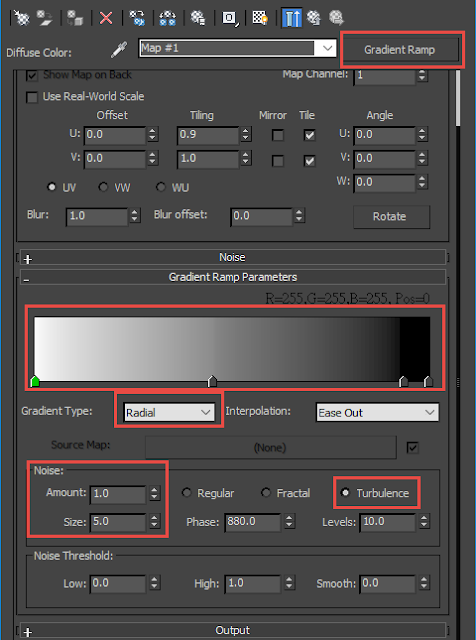
Here is my setting for the Gradient Ramp. This will create a noisy Radial shape on the plane. As the image below:
Animate the outgoing velocity of your Fire/Smoke source a few frames, allowing smoke puff out from the plane, forming cloud-like shape.
Here is my Dynamics setting of the Simulator.
For the rendering, it is important to set your Scattering as "Ray-Tranced" to get realistic cloud rendering.
Left: approximate + Shadows; Right: Ray-Tranced scattering
You could generate different cloud by using different texture as a mask.
Enjoy making clouds with Phoenix FD :)
For a more detail, steps by steps tutorial, please check this
link on ChaosGroup official help page.


No comments:
Post a Comment