

by Hammer Chen
Creating an image-based colored smoke is pretty straightforward with Phoenix FD. Here are three key steps you need to know:
1. Output RGB channel
Check RGB checkbox in the output section

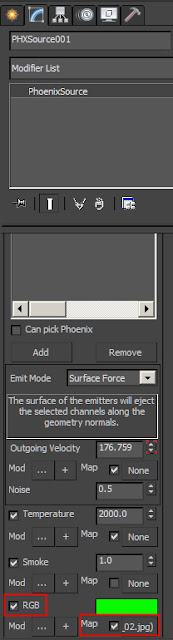
2. PHXSource with RGB checked and plugged in your custom texture map
3. Simulator / Rendering
The default smoke color is based on "constant color," choose Based on "RGB" so you can render out your colorful smoke.


3. Simulator / Rendering
The default smoke color is based on "constant color," choose Based on "RGB" so you can render out your colorful smoke.


No comments:
Post a Comment